


DDKT Explore’s Advanced Settings allow you to refine your audience analysis by excluding irrelevant keywords and selecting a target country. These options help improve the accuracy and relevance of your AI-generated audience reports.
1. How to Enable Advanced Settings #
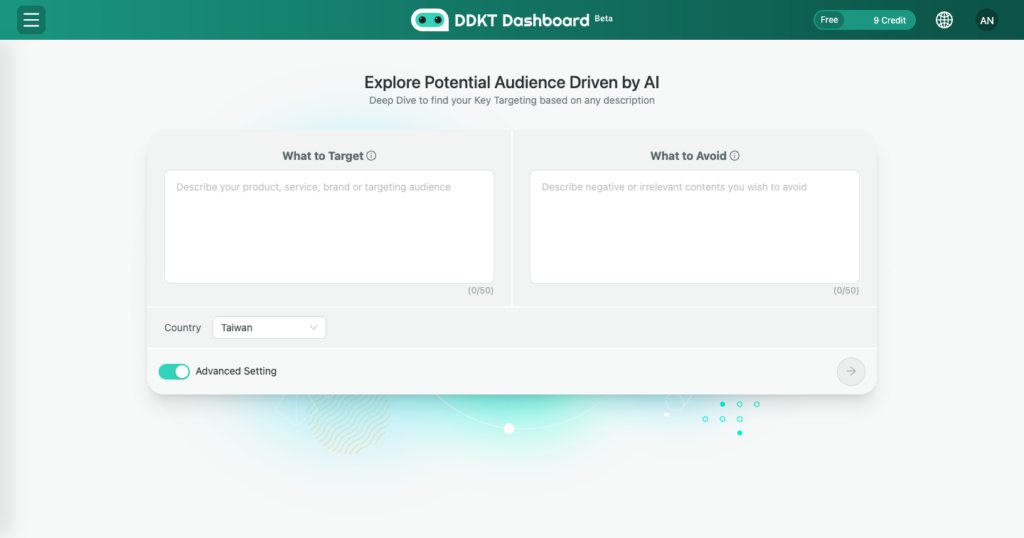
On the Explore page, toggle the “Advanced Settings” switch to reveal two additional input options: Exclude Keywords and Country Settings.
2. Exclude Keywords (What to Avoid) #
Enter any negative or irrelevant terms you want the analysis to avoid. This helps filter out audiences that are not relevant to your target, improving the precision of your results. For example, if you are analyzing premium shoe brands, you might exclude terms like “second-hand” or “discount”.
3. Country Settings #
Select the target region for your audience analysis. DDKT currently supports the following countries:
The selected country determines which regional audience data is used to generate your report. If no selection is made, Taiwan is used by default.


